School transport, from route sheet to the live bus.
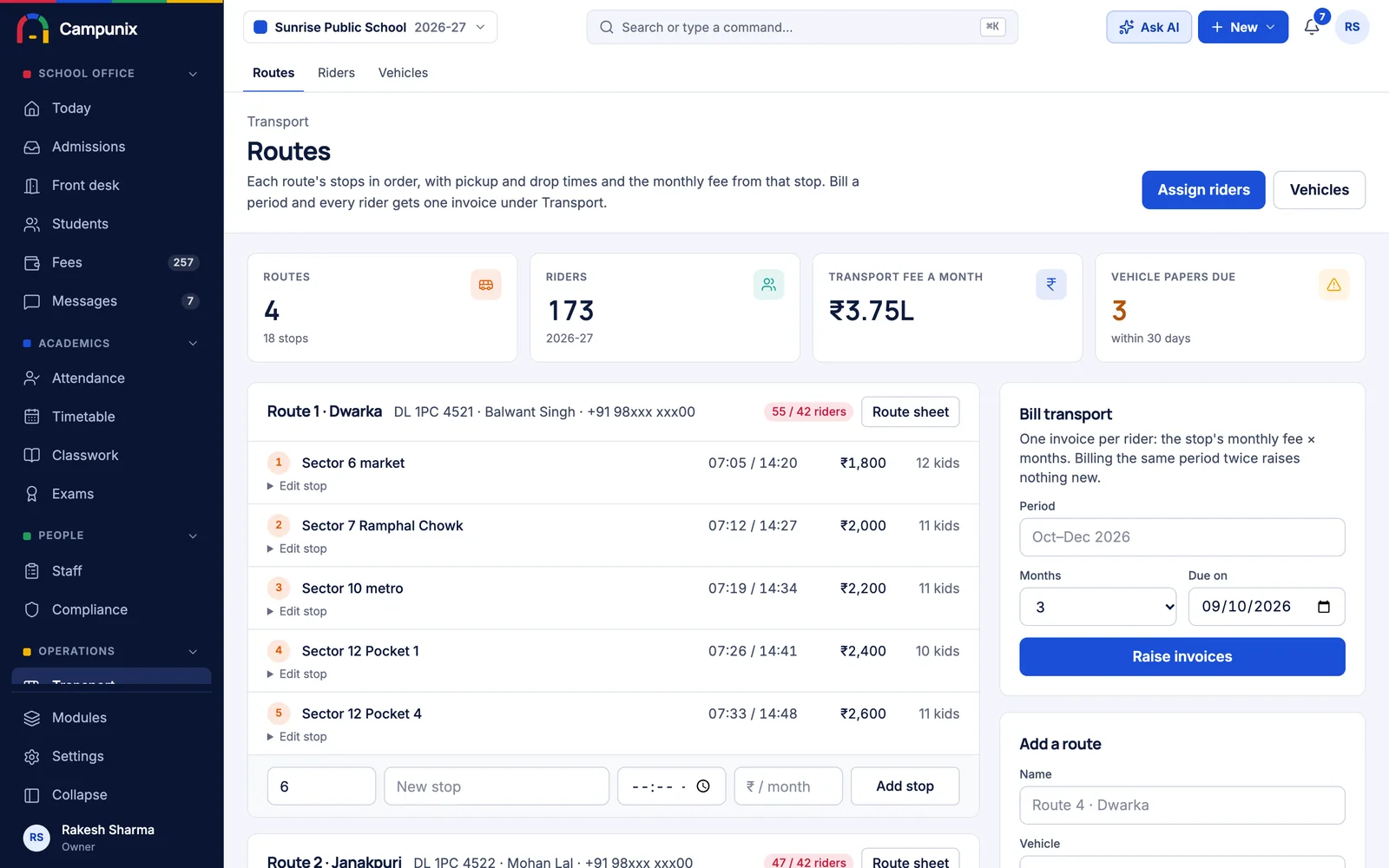
Routes, stops, riders and transport fees run in Campunix today. A driver app, an attendant (conductor) app and the live bus for parents are in build, on the same records.
Four people, one trip.
Every school bus run involves the office, a driver, an attendant and a few dozen parents. Each gets their own view of the same trip.
- 01
Transport office
Routes, stops, riders, vehicle papers and transport fees.
Works today - 02
Driver
Starts the trip; the bus's position is shared until it ends.
In build - 03
Attendant or conductor
Taps each child on and off. That is the bus register.
In build - 04
Parent
Transport fee with a UPI link today; the live bus next.
Works today
The transport office, sorted.
- Routes and stops
- Stops in order with pickup and drop times and a monthly fee from each stop.
- Riders by stop
- Which child gets on where, with the bus's seats shown against its riders.
- Route sheets
- A printable sheet for the attendant: stops in order, each child with class and a parent's phone.
- Vehicle papers
- Fitness, insurance, PUC, permit and the driver's licence, amber a month before they lapse and red after.
- Attendant on every bus
- Drivers and attendants on file, with a warning for any bus without an attendant.
- Transport billing
- One invoice per rider for a period, from the stop's fee. Billing the same period twice raises nothing.
Three apps, in build now.
The screens below are design previews, drawn to show what each person will see. They are not screenshots, and we will tell you the honest date for each.
The driver taps Start. The office sees the bus.
A small Android app on the driver's phone. Between Start trip and End trip it shares the bus's position every few seconds, and keeps sharing with the screen off.
- Sign in by phone number and a one-time code
- Next stop, distance and whether the bus is on time
- Positions queued through dead zones, sent when signal returns
- An SOS button to the transport in-charge and principal
Bus 4 · Morning run
Route 4
Sharing location
Next stop
Green Park Gate
Due 7:14 · 4 to pick up
- Sector 9 Market6:58
- Lake View Society7:05
- Green Park Gate7:14
- Ram Nagar Chowk7:22
- School7:40
Every child tapped on, every child tapped off.
The attendant or conductor sees the children due at each stop and taps each one on and off the bus. That becomes bus attendance, and the parent hears the moment their child boards.
- Children listed by stop, with class
- A count on the bus at all times
- The 'boarded' and 'dropped' message to each parent
- Who tapped it and when, on the record
Stop 3 of 5 · Bus 4
Green Park Gate
14 of 24 on the bus
- ASAarav S.Class 3 BOn bus
- AKAnanya K.Class 5 AOn bus
- KMKabir M.Class 1 CTap on
- DPDiya P.Class 2 AOn bus
- VRVihaan R.Class 4 BTap on
Each tap marks bus attendance and tells the parent their child is on board.
Parents stop calling to ask where the bus is.
During the trip, the parent page shows the child's bus on a map with the time to their stop. A WhatsApp goes out when the bus is two stops away.
- No app to install; it opens from WhatsApp
- Time to the stop, worked out from the route
- A message two stops before pickup
- Visible only during the trip, only for their own child
Aarav S. · Class 3 B
Bus 4 is on its way
Seen only during the trip, and only for your own child's bus.
A driver scorecard, every Monday.
Worked out from the trips themselves, so the transport in-charge talks about facts, not complaints.
- Punctuality
- Actual arrival at each stop against its pickup or drop time, already set on the route.
- Speed
- Time above the school's limit. The default is 40 km/h, as CBSE's transport guidance asks.
- Route discipline
- Distance away from the planned path of stops.
- Missed stops
- A stop with riders where the bus never came close.
- Trip discipline
- Late starts, and trips that were never ended.
- Monday summary
- A scorecard per driver and per route, with one line to the transport in-charge on WhatsApp.
Two ways to know where the bus is.
The driver's phone
Nothing to fit on the bus. Works from the first day on any Android phone. This comes first.
The bus's own GPS box
Many school buses already carry one. Linked through the GPS device field on the vehicle, it does not depend on anyone's phone battery. Added per device vendor.
A child's location, handled with care.
- Only during a trip
- Positions are recorded between Start trip and End trip, never in between runs.
- Kept 60 days
- Raw positions are deleted after 60 days. Trip summaries and scorecards stay.
- Your child, your bus
- A parent sees only their own child's bus, and only in that bus's trip window.
- Names stay with the attendant
- The driver sees stops and counts. Children's names and parents' phones show only to the attendant.
- Handled as sensitive data
- A child's location is treated as sensitive personal data under the DPDP Act.
- Kept in India
- Stored on servers in India, walled off from every other school.
Questions about transport.
What can we use today?
Routes and stops with times and fees, riders by stop, route sheets for the attendant, vehicle papers with expiry warnings, drivers and attendants on file, and transport billing on the same fee ledger as tuition.
Do our buses need a GPS device?
No. The driver app uses the driver's Android phone. If your buses already carry a GPS box, we can take positions from it too, which does not depend on anyone's phone battery.
Why an app for drivers and not a web page?
A web page stops sending location when the phone's screen turns off. A small Android app keeps sending, and holds positions in a queue through dead zones.
How does the driver sign in?
With their phone number and a one-time code. No password to forget.
What happens in an emergency?
The driver app has an SOS button that alerts the transport in-charge and the principal.
When will the apps be ready?
They are in build now, in this order: the driver app and the office's live map, then the live bus for parents and attendant taps, then the scorecard. Ask us for the current date when you book a demo.
Bring one route
Send us one route with its stops and riders. We will set it up in front of you, bill it, and print the attendant's sheet.